November 7th, 2023
New
Improved

Model manipulation is now streamlined with the 3-in-1 gizmo, allowing you to move, rotate, and scale seamlessly without toggling between modes.
Additionally, you can directly reposition a model by just clicking and dragging, no gizmo needed.
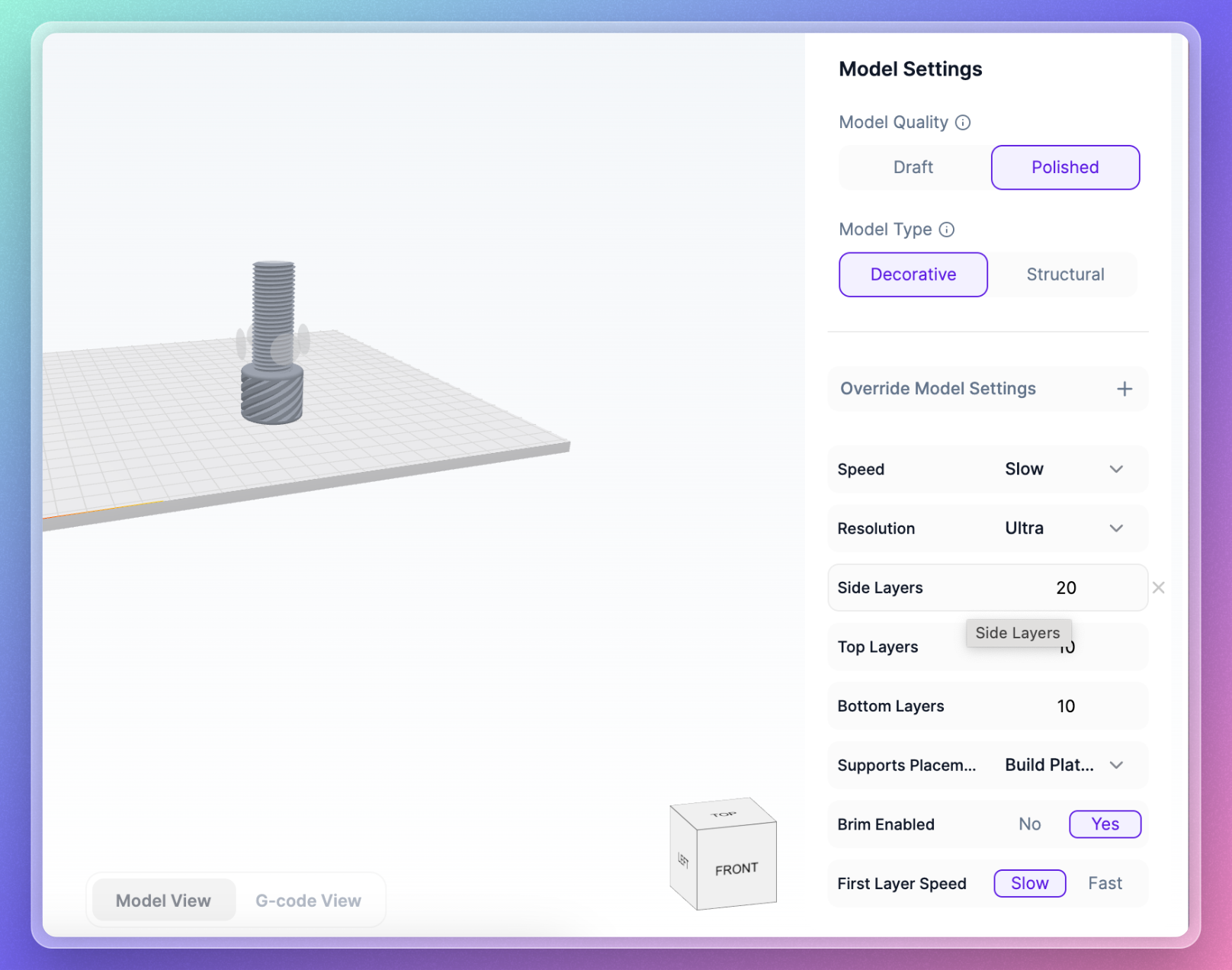
Inline Model Setting Overrides
Model Setting Overrides have been reworked for clarity and convenience. Modified settings are now visibly highlighted in the sidebar, providing immediate context on your customizations.
For added ease, a 'Reset Setting' button next to each setting allows you to revert changes back to the default, a handy tool if the original value slips your mind.
Upload Manager Rework
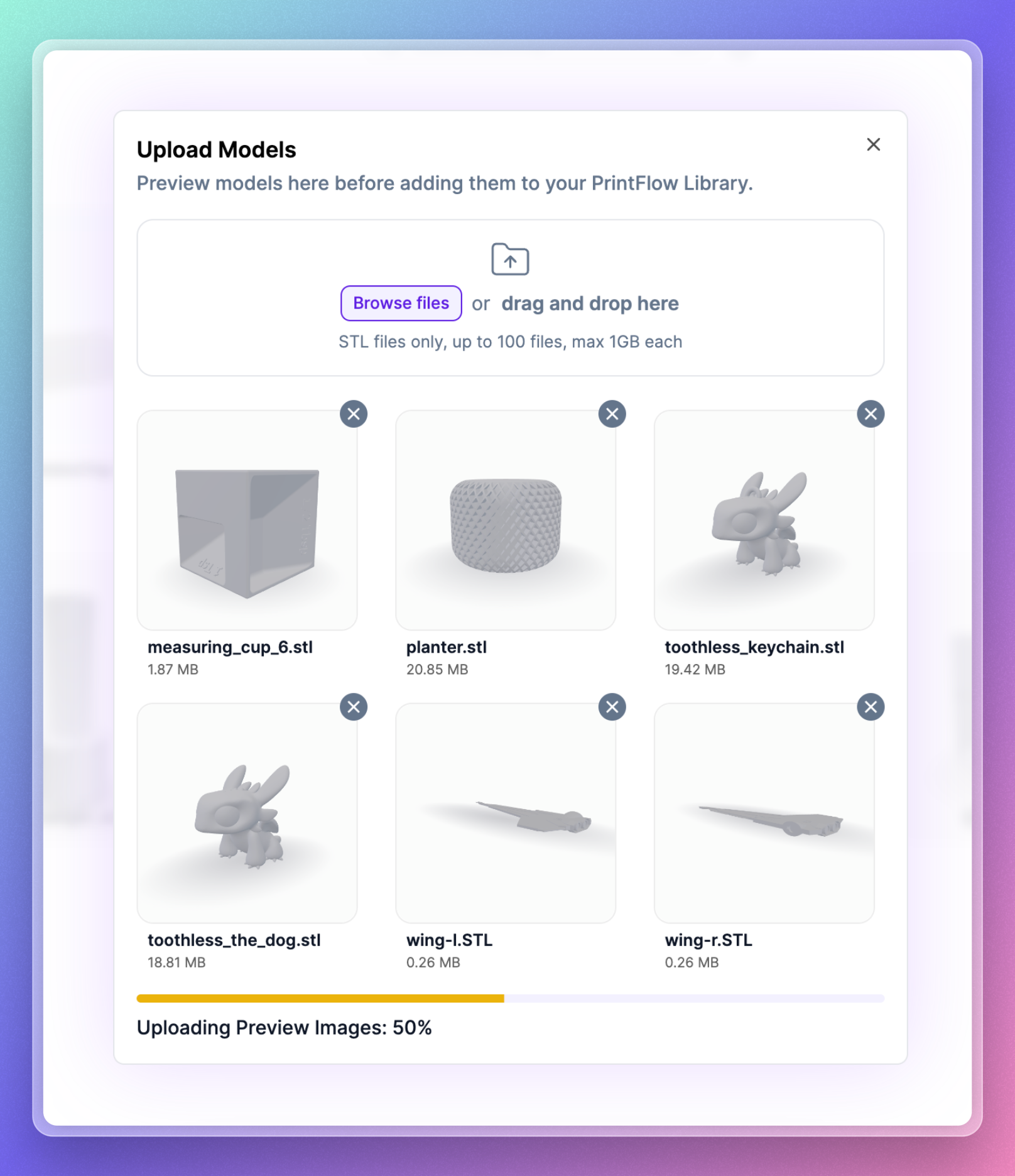
The upload manager now features enhanced context and more intuitive controls, offering immediate visual feedback when generating and uploading preview images, eliminating perceived delays in model uploads.
September 12th, 2023
New
Improved
Fixed
Dynamic Print Engine V3
We’re excited to roll out Dynamic Print Engine V3! We've spent two weeks fixing the sluggishness and glitches in V2. This affected everything in Printflow, from printer and material dropdowns to slice times.
We weren't happy with V2's performance, so we rebuilt the engine. Now it's faster, more reliable, and easier for us to add new printers and materials.
Main Improvements Stemming from DPE V3
- Lightning fast speeds 🏎
- Improved calibration reliability for advanced materials like PETG, ABS, & Nylon
- Improved default profiles for materials like PETG, ABS, & Nylon
Library Upload Speeds
We've boosted upload speeds in the library for everyone, including those on slower internet connections. Enjoy faster, more reliable uploads!
New Printer Support
Snapmaker
Artisan
Sovol
SV06
SV06 Plus
SV05
SV03
AnyCubic
Chiron
Kobra
Kobra Plus
Kobra Max
Kobra Go
Kobra Neo
Vyper
Artillery
Genius
Sidewinder X2
Genius Pro
Hornet
Elegoo
Neptune 2
Neptune 2S
Neptune 2D
Neptune X
Neptune 3
Neptune 3 Pro
Neptune 3 Max
Neptune 3 Plus
Creality
K1
K1 Max
Ender 3 Series
Ender 2
Ender 3 S1 Pro
Ender 3 S1 Plus
Ender 3 V2
Ender 3 V2 Neo
Ender 3 Max
Ender 3 Max Neo
Ender 5 Series
Ender 5
Ender 5 S1
Ender 5 Plus
CR-10 Series
CR-10
CR-10 Smart
CR-10 Smart Pro
CR-M4
CR-6 Series
CR-6 SE
CR-6 Max
Other Improvements & Fixes
Sorting in the Library now applies to folders
Uniform scaling now default
Fixed number bug in Duplicate Model Dialog
Fixed false out-of-bounds warnings on models
Fixed a bug where draft & polished speeds were inverted
Fixed a bug that caused calibrations to print at the wrong layer height
Fixed a bug where files were not always uploading in the current folder
Fixed a bug where the upload dialog didn't always clear models that were already uploaded
August 22nd, 2023
Improved
Fixed
From listening to user feedback and our own use of the 'Builds' feature, we identified two points of contention.
Build Clarity:
Knowing which Build was open was confusing.
If you left the slicer page, the previous Build stayed open, leading to uncertainty.
Now, when leaving the slicer, the Build closes. Opening a model from the Library starts a new Build.
Adding Models from the Library: This problem was addressed in two main ways:
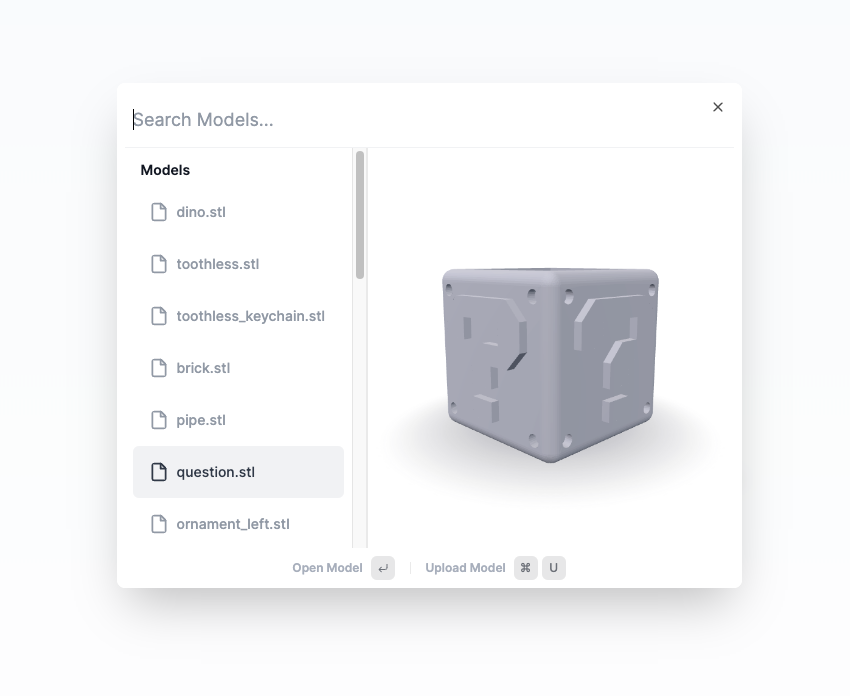
Command Menu with Model Search:
Clicking the '+' button now opens a command menu with a search function for models.
Enhancements to the command menu include bug fixes and speed improvements.
Easy Model Uploading:
Uploading new models is simpler.
Use the 'U' keyboard macro or click the upload model option within the command menu.
Other Improvements & Fixes
Improved Slicing Indicator:
The 'Slice', 'Re-slice', and 'Download G-code' buttons are now located at the top of the slicer in the global toolbar.
Accompanying this new placement are redesigned indicators that provide a more coherent view of the slicing progress.
Model Search Bug Fix:
Previously, searching for models yielded inconsistent results due to bugs.
These issues have been fixed, resulting in more reliable search results.
August 8th, 2023
New
Improved
Fixed
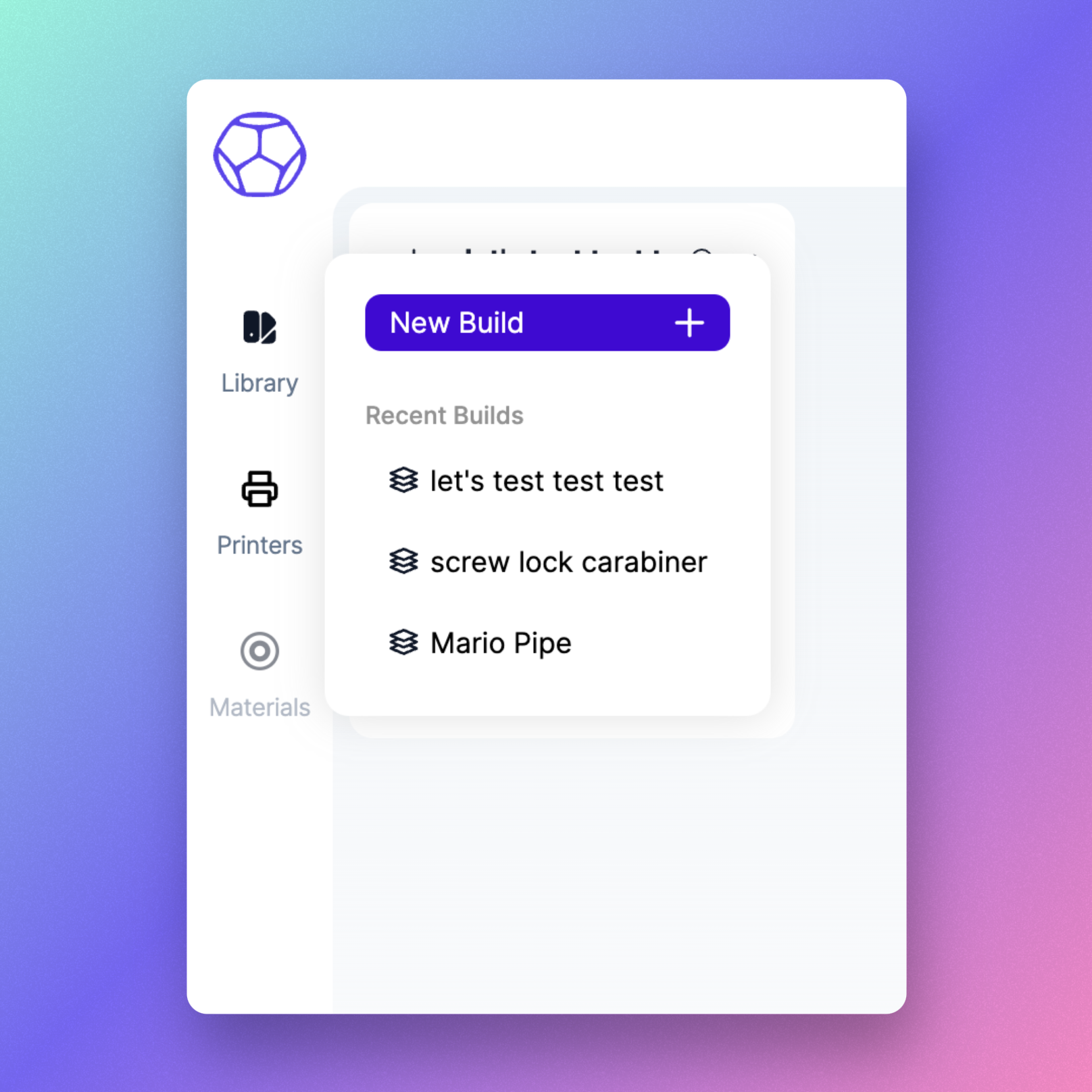
Updated Navigation Bar Design with New Functionality!
We've given our navigation bar a fresh look to make it easier on the eyes and simpler to find your way around. Hover over an item, and you'll see a handy popover with helpful information and quick actions. We hope this update makes your navigation experience smoother and more intuitive!
New Macro List & Redesigned Top Bar
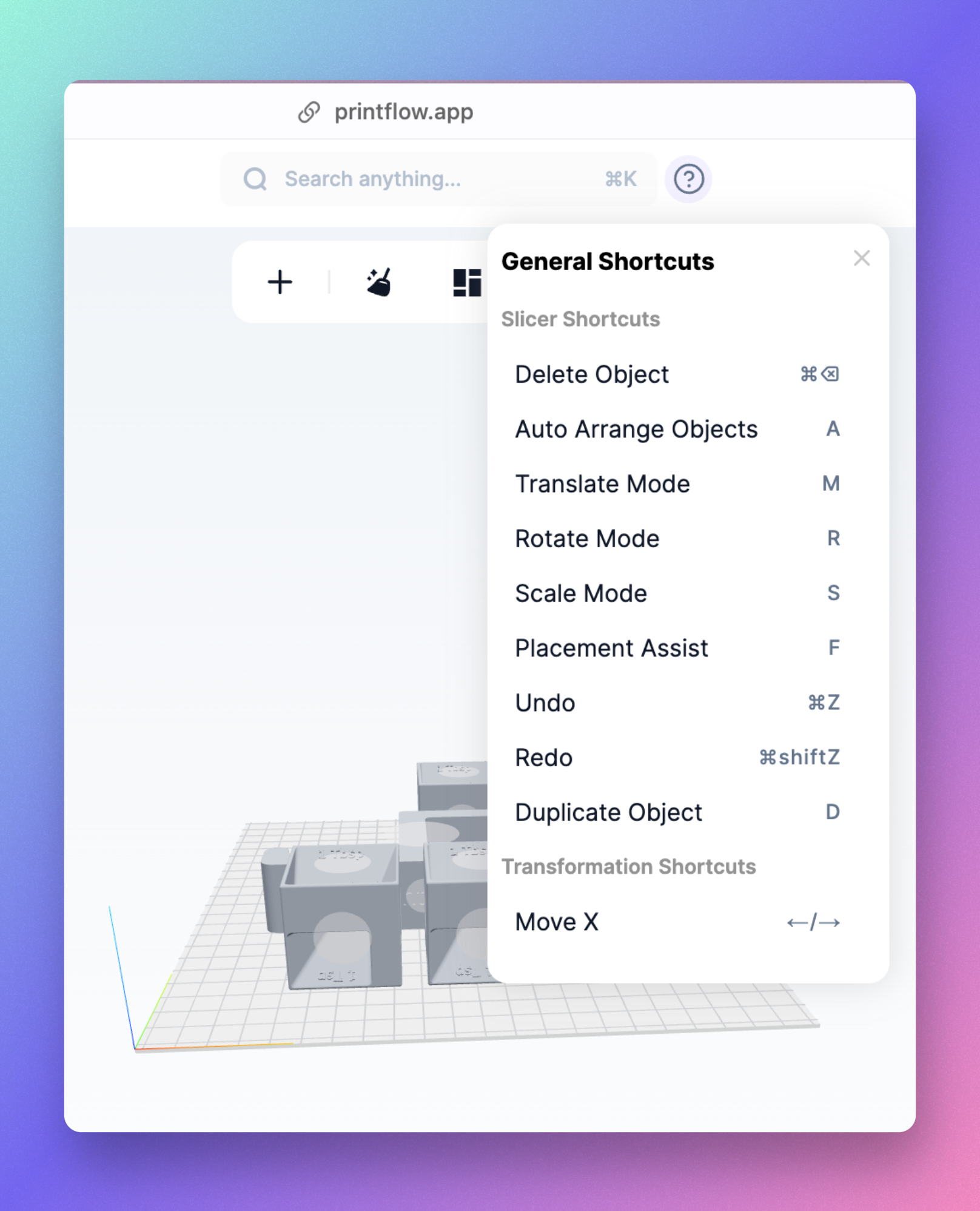
We've updated the top bar with a fresh new look, now featuring an easy-to-reach search button that triggers the command menu. Additionally, we've added a much-requested macro list. Simply hover over the question mark button, and all the available keyboard shortcuts will be made visible.
Other Improvements & Fixes
Drag and Drop Multiple Models: You can now drag and drop multiple models simultaneously into a folder.
OS-Specific Keyboard Shortcuts: Keyboard shortcuts are now displayed according to your operating system; ⌘ on Mac and ctrl on Windows/Linux.
Enhanced Undo/Redo in the Slicer: The reliability of the undo/redo function in the Slicer has been improved, resolving issues with 'ghost' actions being logged in the history.
Height Warning Indicator: A warning will now be shown if a model exceeds the build volume's height constraints, in addition to the x and y dimensions.
August 1st, 2023
New
Improved
Fixed
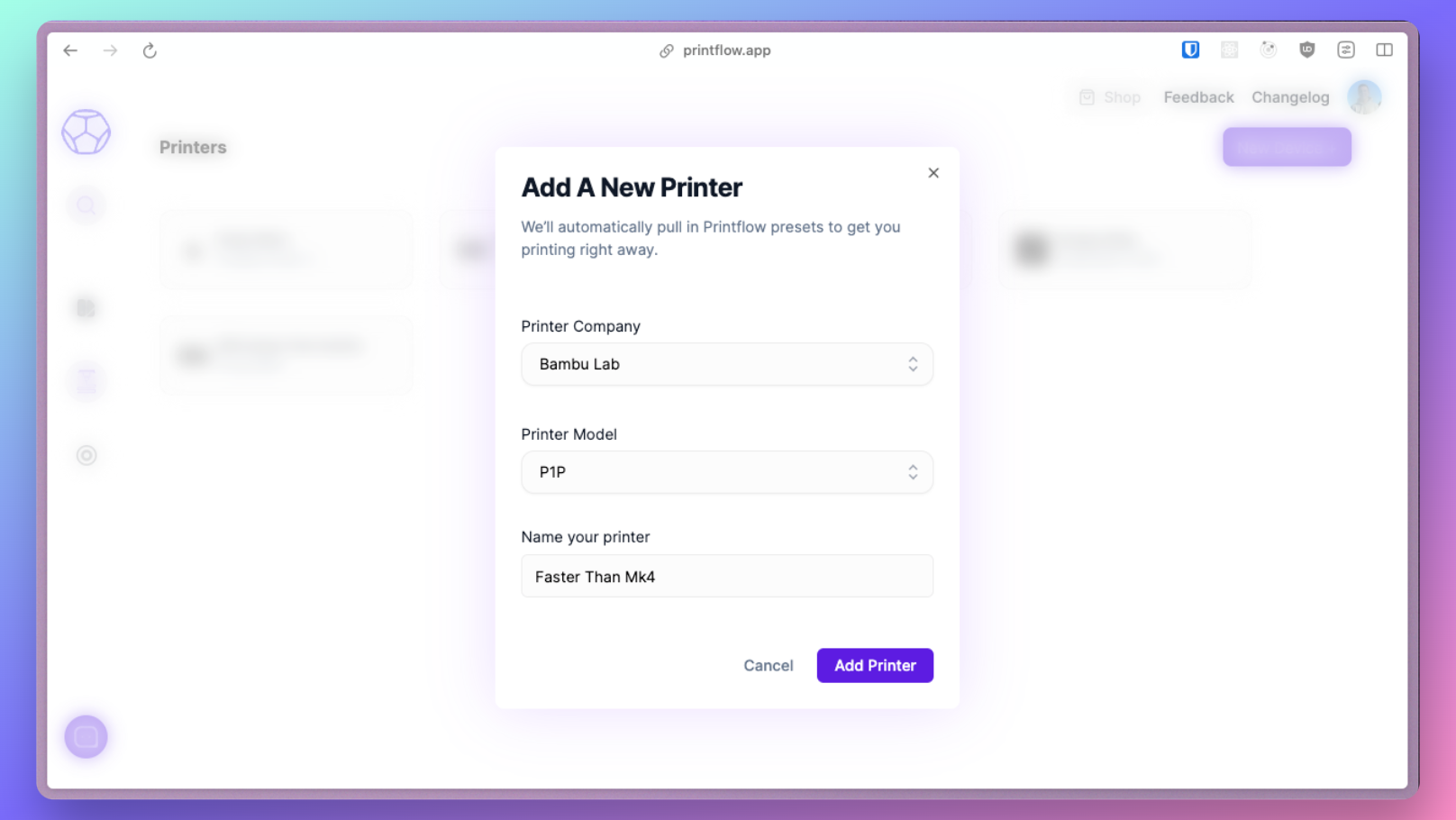
New Bambu Labs Support
Printflow now supports printing on BambuLab P1P and X1C series printers! Note: the g-code viewer currently does not work with these models, and will be fixed in a subsequent update.
Bug Fixes
Fixed an issue with unsuccessful uploads at slower internet speeds.
Corrected a bug where double-clicking the upload button caused an error.
Resolved a problem where all models were cleared upon refreshing the slicer page.
Addressed a user-reported issue where supports were not applied when enabled.
Fixed incorrect slicing with 0.80mm nozzle showing 20 temperature ranges instead of 8 on a 0.40mm nozzle.
Corrected a calibration indicator bug to properly show the number of calibrations completed.
Improvements
Printer selection now defaults to the last used printer for new builds.
Enhanced toast notifications throughout the app, especially in the slicer.
Hovering over an object in the build list now highlights the corresponding model on the build plate.
Flowrate calibration updated with a new model for increased accuracy.
Infill speeds significantly enhanced following flowrate test improvements.
Acceleration limits increased for all printers.
Upgraded max flow rate calibration.
Added calibration support for Bambu Lab printers.
July 25th, 2023
New
Improved
Fixed
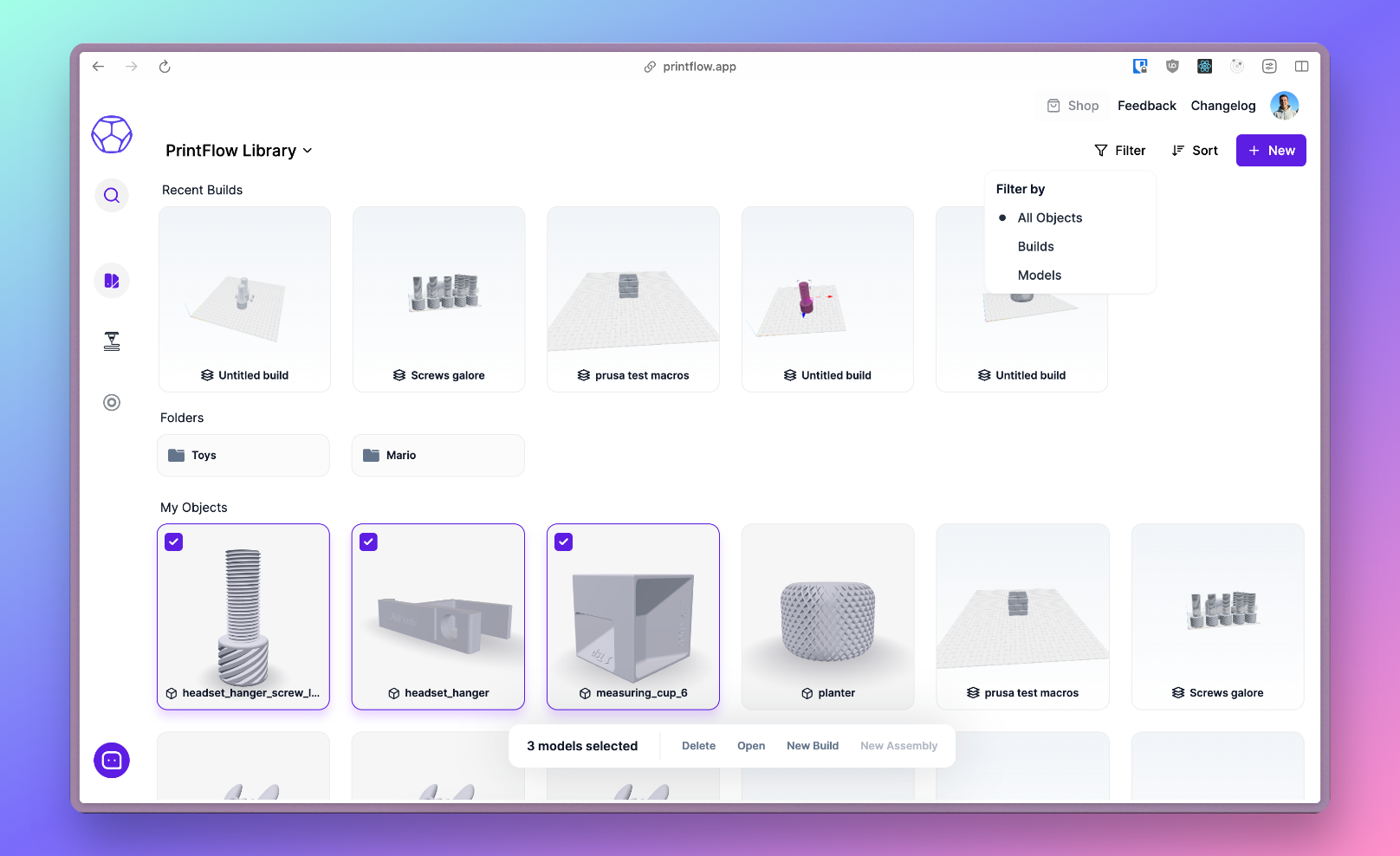
Multi-Select Models & Bulk Actions Toolbar
We've introduced the ability for you to select several models at once in the library. To make handling these models easier, there's a new, convenient bulk actions toolbar at the bottom - making your workflow more efficient.
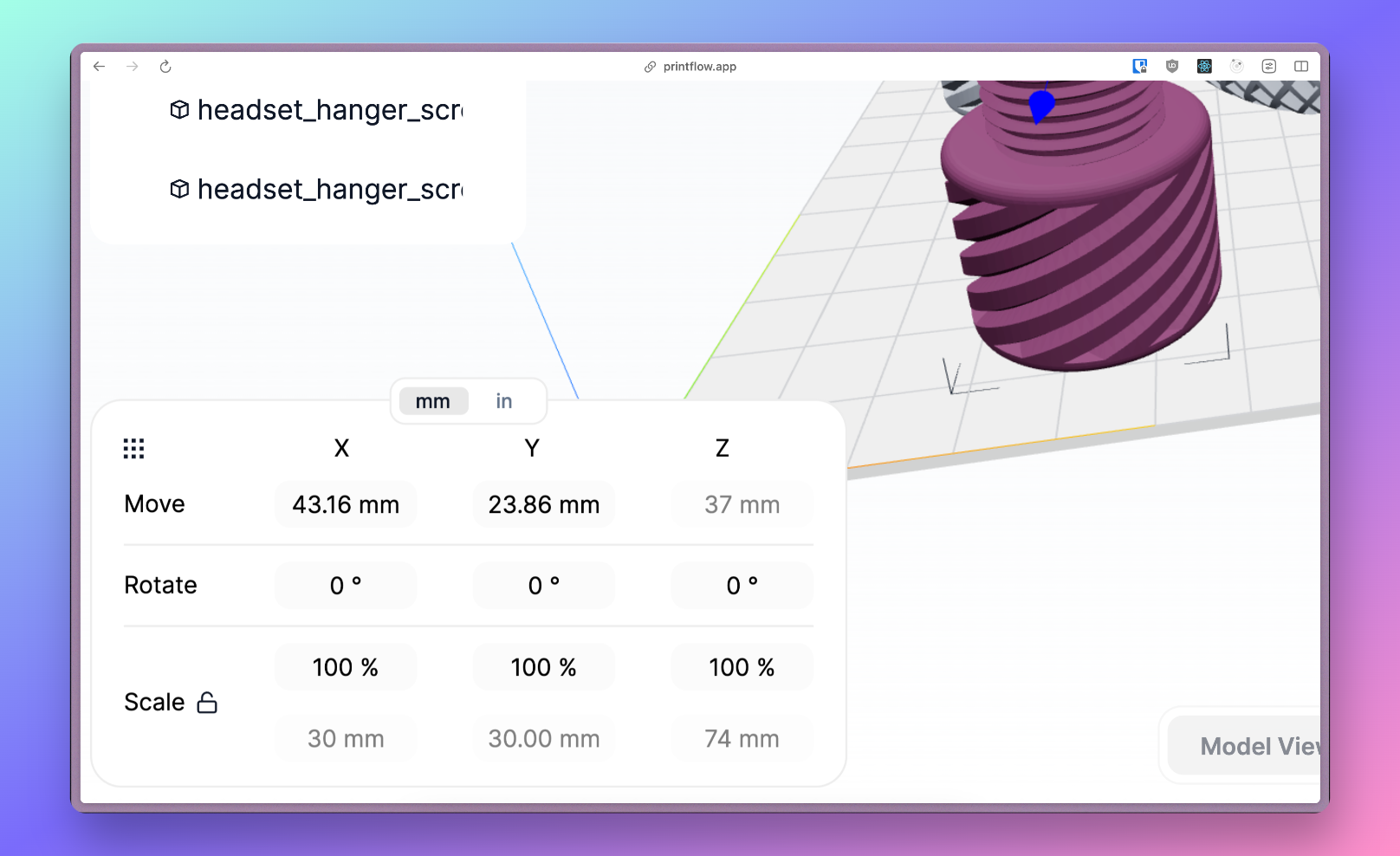
Object Manipulation Upgrades
We've enhanced object manipulation features:
You can now toggle unit display between millimeters and inches.
We've added a lock/unlock button for easy and precise uniform scaling.
Real-time model size viewing is now possible while scaling for improved accuracy.
Other Improvements and Fixes
Support for Creality Ender 5 Plus is now available.
Macro keys no longer conflict with system shortcuts on Windows/Linux.
Warnings issued for objects outside the build plate.
Enhanced the reliability of the auto-save indicator.
Fixed the bug restricting '0' entry in all input fields, especially in object manipulation and advanced slicer settings.
File limit in slicer and library increased from 10 to 100.
Added 'Recent Builds' section to Library page.
Added filtering option for models or builds in the Library.
Alphabetical sorting is now available in both A-Z and Z-A order.
Models in folders now displayed in command bar search.
Faster combo box speeds when changing printers.
User-defined settings in advanced slicer settings are now preserved when changing print quality or type.
July 18th, 2023
New
Improved
Fixed
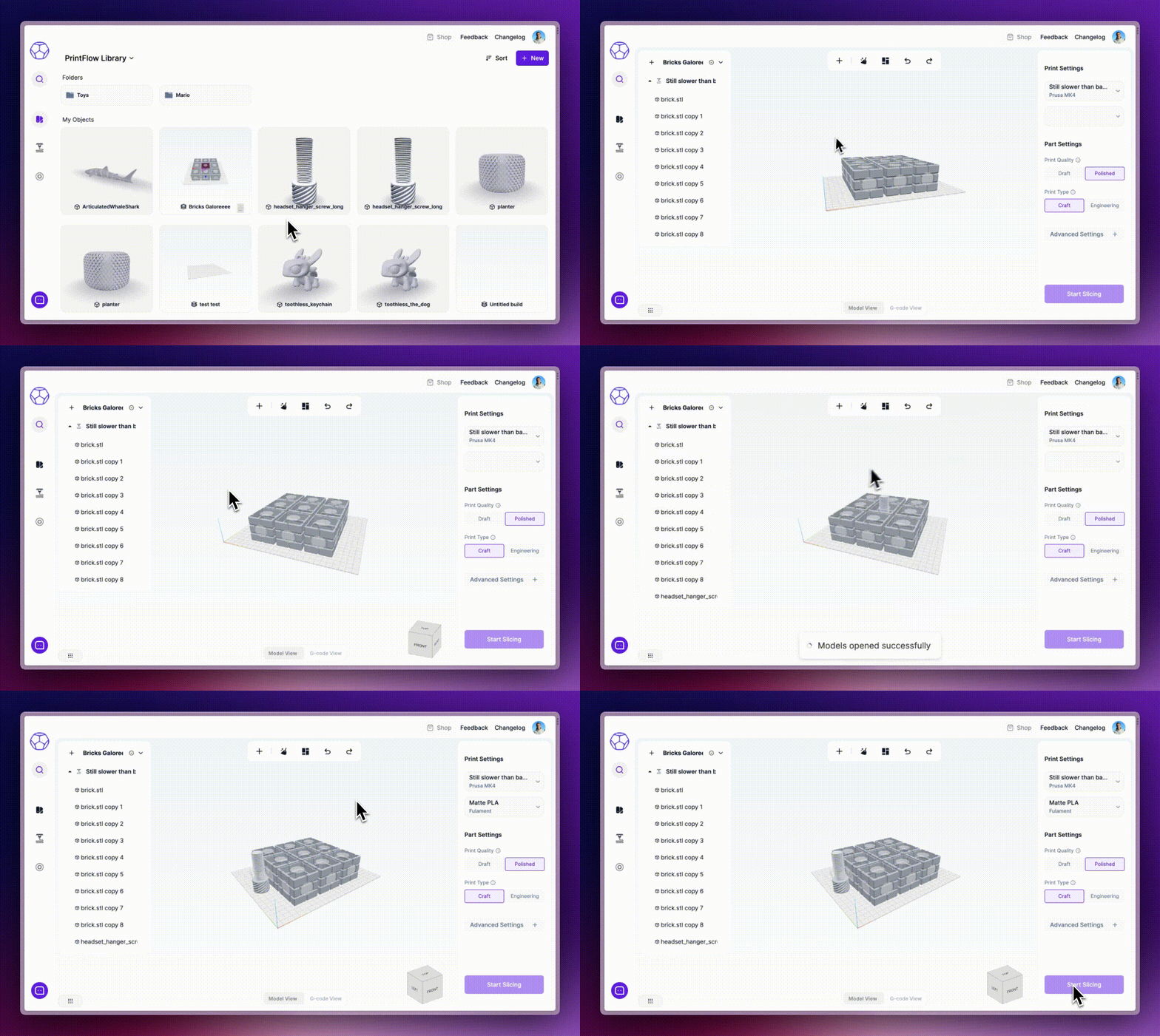
In 3D printing, every detail matters. To make your life easier, we're rolling out Builds, a new feature that auto-saves all components of a print job—parts, positioning, scales, settings, and more—into a "build file" in our PrintFlow library.
With Builds, you can:
Start from scratch with a new build directly from the slicer or PrintFlow library.
Use the command menu (CMD or Ctrl+K) to add models to your build.
Rest easy knowing all changes to your build are auto-saved, keeping the process smooth and simple.
Access and reopen recent builds directly from the PrintFlow library.
These key details—including the name, filament used, printer settings, and a visual snapshot—are saved with each build, making them easily identifiable and searchable in your library.
This is just the start of making 3D printing with us even more user-friendly. Try out Builds today, and enjoy the streamlined experience!
Other Improvements & Fixes
Printer searching functionality has been improved in the Material & Printer combo-boxes.
Temperature ranges for Temperature Calibrations have been updated for all materials.
Fixed compatibility issues with Prusa printers.
Adjusted Z Travel speed to prevent any grinding noises.
Prusa MK4 is now configured without Input Shaping.
The temperature calibration model has been refined for faster print times.
The speed calibration has been updated to enable quicker printing.
Printers featuring PrintFlow calibrated profiles are now identifiable with a purple marker under the Printer dropdown in the slicer.
We've added the ability to request nozzle diameter changes via chat.
New material profiles (ABS, ASA, TPU, TPE) have been incorporated into the filament library.
A new calibrations indicator has been added to printer & material drop-downs in the calibrations menu.
June 27th, 2023
New
Improved
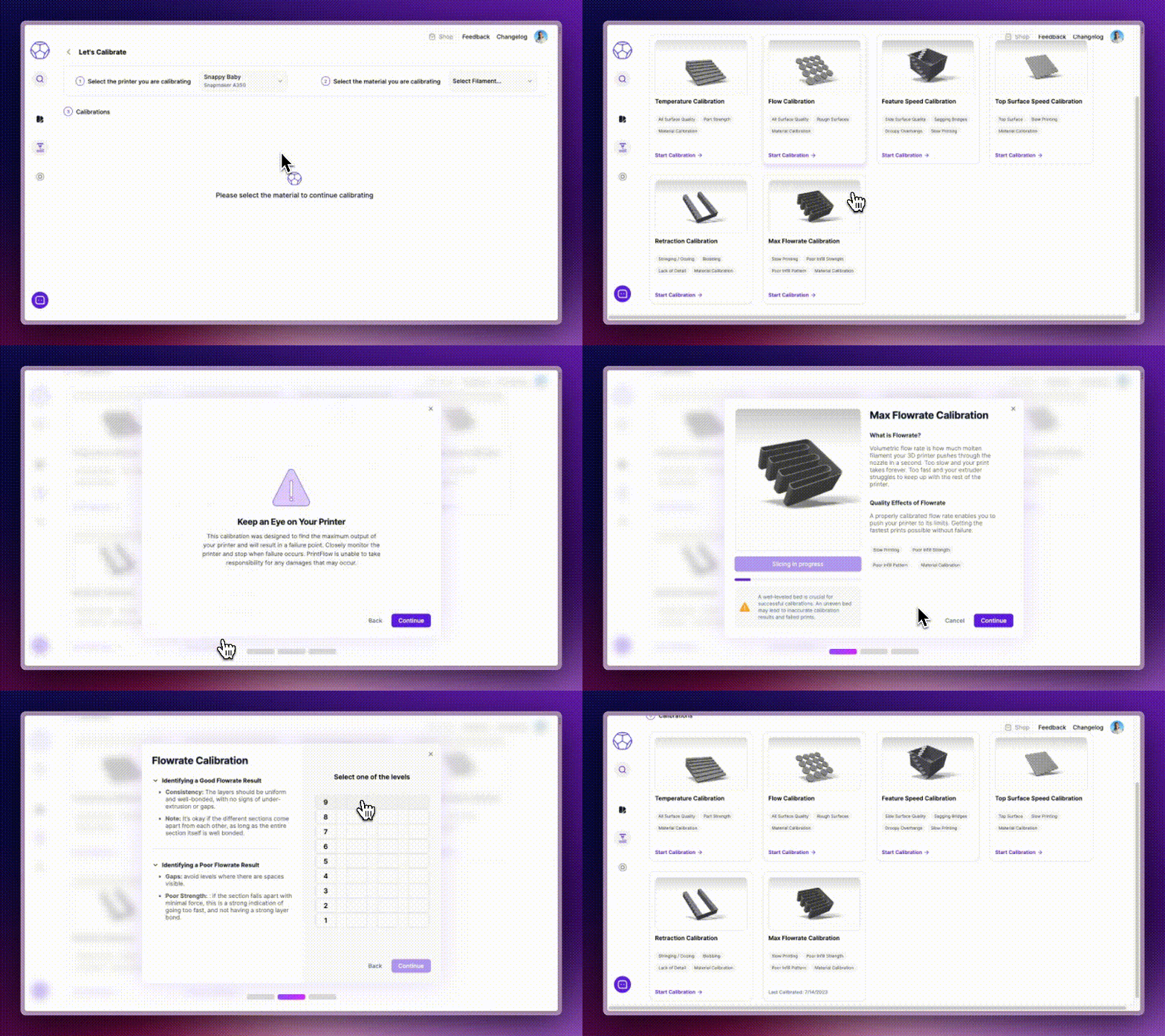
We're excited to announce significant improvements in our calibration process. We've rebuilt our calibration algorithms from the ground up and have also overhauled our calibration workflow to make it significantly more user-friendly and easy to understand. This not only delivers faster and more efficient performance but also ensures that all calibrations yield more successful and clearer results, making it easier for users to score.
While we continue to work on further enhancements, we're thrilled to introduce new features in our user-centric calibration process:
Feature Speed: Adjust printing speed on a per-feature basis.
Top Surface Speed: Manage the speed for printing top surfaces.
Retraction: Fine-tune retraction settings to better control material flow.
Max Flowrate: Set the maximum flowrate for improved printing precision.
We believe these improvements will make the calibration process more intuitive and efficient. So, stay tuned for more updates as we continue to refine and perfect our calibration system.
June 20th, 2023
New
Improved
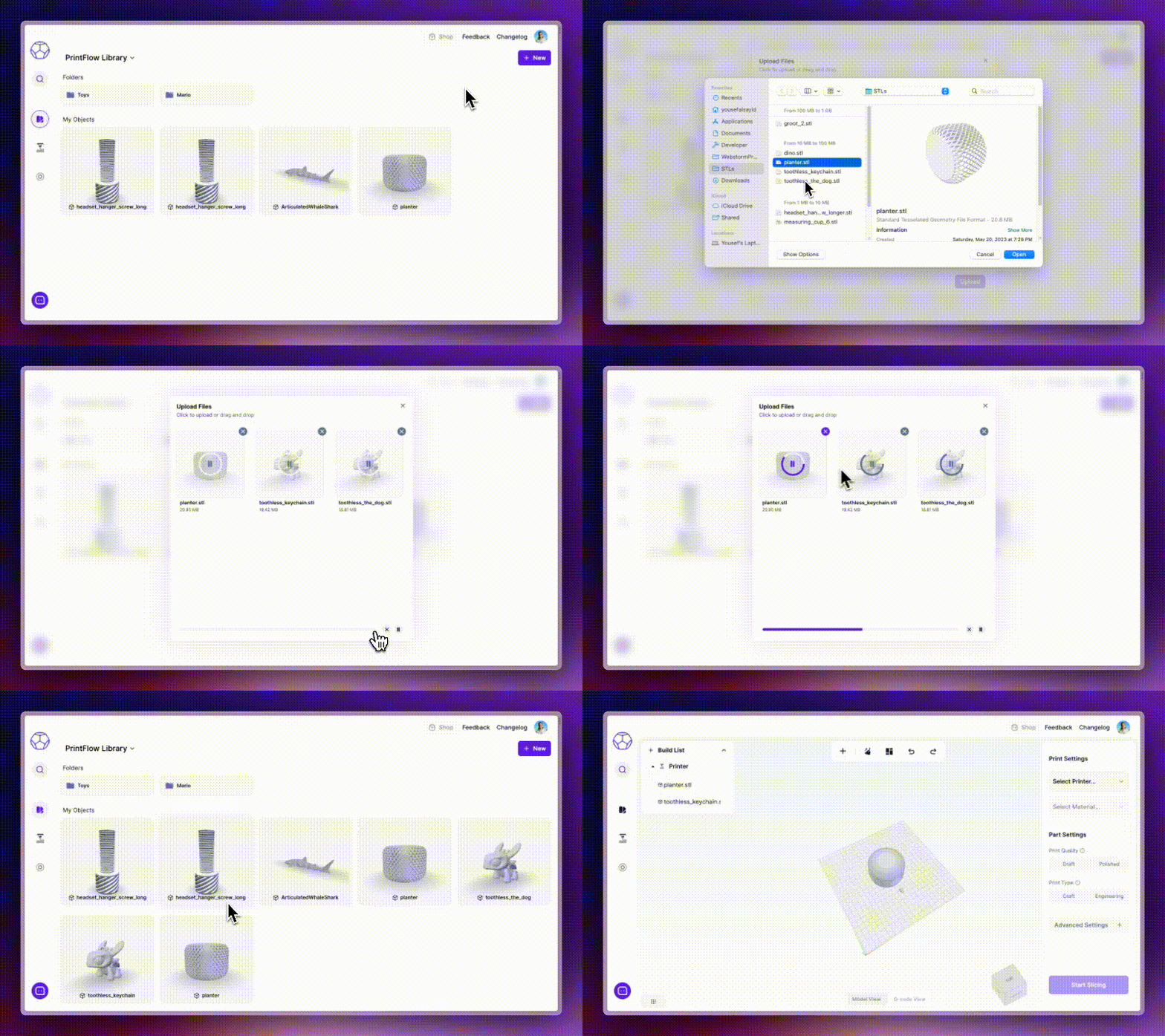
We see the PrintFlow library as your gateway to PrintFlow, equipped with a robust workflow that empowers you to effectively manage and organize your models. However, before we get to that, a strong foundation needs to be built in the form of an enhanced upload experience.
To that end, we've taken a step back to redesign the upload manager. This revised version now allows you to upload multiple files, each up to 1GB in size, and you can upload as many as 100 files at a time. You have the ability to monitor the progress of each file, as well as cancel individual uploads as needed. What's more, you have the convenience to pause and resume your uploads at your convenience.
Additionally, we've added preview images for each model uploaded - a touch we believe ties the PrintFlow library together. Rest assured, this is just the beginning, and there's much more to look forward to!
June 6th, 2023
New
Improved
Super Fast Slice Times
Slice times have been cut by over 95%!!!!! A benchy now slices in under 30 seconds, and complex models now slice in under 2 minutes (down from over 45 minutes).
Our team has turbocharged our API and bolstered server power, leading to a dramatically faster and more efficient slicing process.
You can now also expect over 99% of your slices to complete! We've been hard at work refining the slicer's reliability. The process is now more stable, reducing the likelihood of encountering issues or errors.
Searchable Dropdowns
We have now introduced searchable dropdowns which enable you to directly input the name of a printer or material into the selection field. This feature becomes increasingly advantageous as your lists of printers or materials expand. It significantly improves the usability of all existing dropdowns, and it will be equally beneficial for any additional dropdowns introduced in the future.
Calibration Strength Indicators
You can see the calibration strength of the selected material directly from the dropdown, enabling you to understand what materials have strong profiles, and which materials you should calibrate!